





-
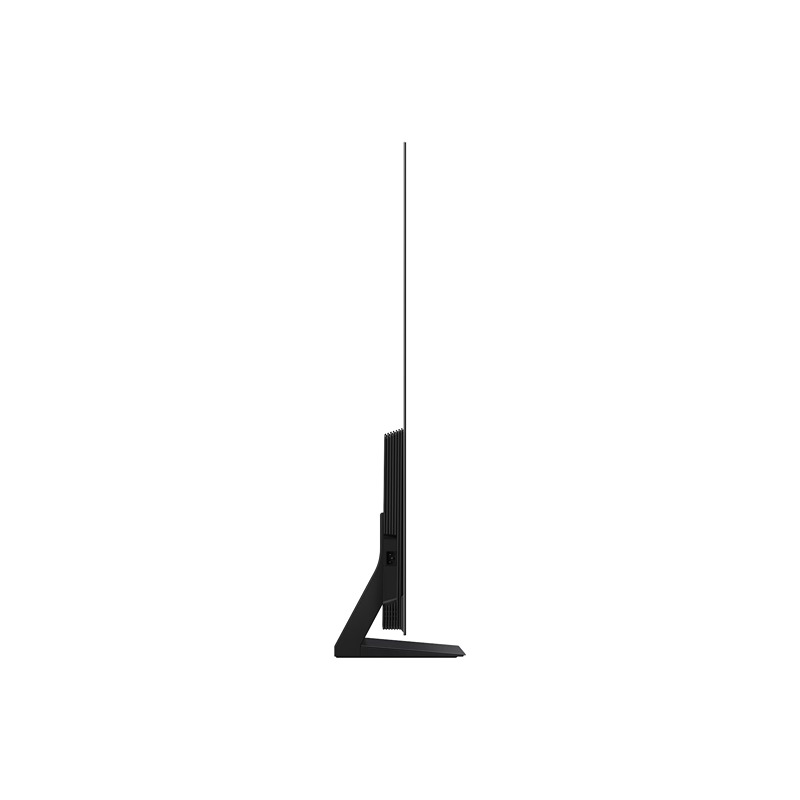
Set Size with Stand (WxHxD)
1444.3 x 896.7 x 265.2 mm
-
Set Size without Stand (WxHxD)
1444.3 x 831.7 x 39.9 mm
Highlights

NQ4 AI Gen3 Processor
Our most advanced AI-powered 4K processor
4K AI Upscaling Pro
Boost shows and movies to 4K resolution
OLED HDR+
Powerful brightness and deeper contrast
Motion Xcelerator 144Hz
Get smooth motion for games up to 144Hz
[T3] Platium Award
Samsung’s S90F is an OLED TV treat every bit worthy of its 5 star score
[TechRadar] Recommends
A big QD-OLED value
Features
Enrich your experience with Samsung Vision AI
An OLED TV with Samsung Vision AI displays purple structures like glaciers on its screen.
Key features at a glance
Companion that enriches your life
A smarter voice assistant
Bixby
With updated intelligence, Bixby in your Samsung AI TV is the perfect center of your AI home. It can process multiple commands at once, and it’s better at grasping the wider context. Enjoy smoother conversations, easier searches, more intuitive reactions and seamless device control.
* Voice commands and multi turn is supported for 10 languages (US/UK/IN(en)/DE/FR/IT/ES/BR/MX/KR).* Not all accents, dialects and expressions recognized.* Q8F and above support far-field mics. Q7F and above support TV remotes. U8000F needs a SmartThings mobile remote.
Our most advanced AI-powered 4K processor
NQ4 AI Gen3 Processor
Powered by 128 AI neural networks, this AI processor enhances your picture and sound to superb heights. Enjoy the best 4K TV experience, whether you’re streaming OTT services, playing your favorite video games or watching live sports.
Samsung NQ4 AI Gen3 Processor chip descends on the TV’s main board and lights up with waves of power surging from the chip to the rest of the TV.
Compared to 2025 OLED S85F (NQ4 AI Gen2)* Viewing experience may vary according to types of content and format.* Upscaling may not apply to PC connection and Game Mode.Boost shows and movies to 4K resolution
4K AI Upscaling Pro
Watch your favorite content in more brilliant detail. Our AI processor can take your content and enhance it up to 4K resolution with 128 AI neural networks — all while maintaining incredibly sharp and smooth picture quality.
Image of a little girl kissing a puppy. The Samsung NQ4 AI Gen3 Processor appears on the photo and enhances several details, including the girl’s hair and clothes and the puppy’s face. The result is a much sharper image where subtle details are visible.
* Viewing experience may vary according to types of content and format.* 4K AI Upscaling may not apply to PC connection and Game Mode.Picture Quality
Powerful brightness and deeper contrast
OLED HDR+
Our processor analyzes each scene and boosts for improved brightness. The result is an incredibly bright screen with a deeper range of contrast, which makes even minor details stand out.
* The range of HDR luminance is based on internal testing standards and is subject to change according to viewing conditions or specifications.* For S90F 42 and 48 inch : OLED HDR applied.
More about
Picture QualityDeep blacks, clean whites and lively colors
OLED
Samsung’s unique OLED expresses deep blacks, clean whites and a full range of lively colors. With cutting-edge self-illuminating pixels, what you see is a picture that’s pure, bright and more accurate than ever before.
Gaming Experience
Get smooth motion for games up to 144Hz
Motion Xcelerator 144Hz
Enjoy seamless visuals at incredibly fast speeds. Samsung’s unique dynamic refresh technology provides smooth motion performance for VRR games up to 4K 144Hz.
* 4K 144Hz is only available with PC connected games that support such specifications (PC graphic card required).* Performance may vary.
More about
Gaming ExperienceFine-tune your game settings as you play
Game Bar
Optimize your gameplay even more with Game Bar. Samsung TVs give you a handy in-game menu for settings like FPS, input lag, minimap zoom and more. It also lets you apply ultra-wide aspect ratios of 21:9 and 32:9 to expand your view on bigger screens.
* Super Ultrawide GameView (21:9, 32:9) is available for certain PC and console games supporting ultrawide screens.* Some game titles may not support this feature.* Game Bar’s Zoom-in mode is not supported for certain refresh rates.* Game Bar UI is subject to change without prior notice.
Sound
TV and soundbar play together in smooth harmony
Q-Symphony
Surround yourself with beautifully orchestrated sound. Samsung technology syncs the TV and soundbar audio to play simultaneously — without muting the speakers of either device.
* Check for Q-Symphony compatibility on soundbar product specifications.* Soundbar sold separately.* The location and number of speakers may vary depending on the model.
One UI Tizen
Personalize your screen experience
One UI Tizen
One UI Tizen provides a personalized screen experience. With Samsung Tizen OS, it delivers all the latest innovative Samsung features. Your experience is also secured by Samsung Knox across SmartThings devices. Plus, One UI Tizen will support Tizen OS upgrades for the next 7 years.
Enjoy 7 years of
new TV experiences
for free* Content and services may vary by region and are subject to change without notice.* Agreement to Smart Hub Terms and Conditions and Privacy Policy is required before use.* Some content and services require registration and subscription.* Requires Samsung account.* Tizen OS upgrades will be supported for up to 7 years starting from 2025, for products released in the year 2025.* Please note that the upgrade does not cover hardware-related performance, features or durability.Access free channels with Samsung TV Plus
Endless Free Content
Access free channels, including Samsung TV Plus premium channels. Enjoy news, sports, movies, entertainment, music, kids’ shows and more. With new content continuously added, there’s always more to explore.
Access free channels, including Samsung TV Plus premium channels. Enjoy news, sports, movies, entertainment, music, kids’ shows and more. With new content continuously added, there’s always more to explore.
The best of TV. All for free.
Samsung TV Plus
Dive into a vast collection of shows, movies and other content on Samsung TV Plus. It comes installed for free on your TV — no payment, subscription or setup required.
* Channels may vary by country and are subject to change without notice.
** Supported Samsung devices may vary by country.
*** Requires Samsung account.
**** UI is subject to change without prior notice.
***** Ads may appear on Samsung TV Plus.
****** Available for free on Samsung Smart TVs released since 2016.More about
One UI TizenElevate your day with curated lifestyle experiences
Samsung Daily+
Find apps and services for health, work and lifestyle on Samsung Daily+. You can access SmartThings, Workout Tracker, karaoke and more, all in one place.
* Samsung is not responsible for any third-party services, and is not liable for any damages or losses caused by any third-party services.
SmartThings
Connect and manage your smart home devices, all from your TV
SmartThings
With a built-in smart hub, your TV can connect and control smart devices — even those requiring Matter and HCA compatibility. You can also get notifications about your devices straight from the screen, including a 3D Map View that shows your entire smart home system at a glance.
TV in living room shows SmartThings screen. SmartThings and Matter logos. Icons appear over the connected devices. Zoom in on TV shows SmartThings in different rooms. Focus on light’s status. It goes from Off to On. Blind goes from Off to Opened. Zoom out to show TV displaying smart home info.
* Available technology, functions and features may vary by country, service provider, network environment or product, and are subject to change without notice.* Requires a Wi-Fi, Bluetooth or other wireless network connection and login to Samsung account.* Connected devices are sold separately.* Use of calm technology requires agreement to privacy notices from both SmartThings and the auto-registered device.* TV and mobile device must be connected to SmartThings to use 3D Map View function. For a detailed list of supported devices, visit https://partners.smartthings.com/supported-devices.* UI is subject to change without prior notice.More about
SmartThingsGestures to control with your watch
Universal Gestures
Easily control your TV with your smartwatch. Just wear your Galaxy Watch and use hand gestures, like pinching to select an option, or moving your wrist back and forth for pause and play.
* Available apps and services may vary and are subject to change without notice.* Only supported on Galaxy Watch4 and later models, and Wear OS 5 and higher versions.
Design
A sleek design that complements any space
LaserSlim Design
OLED’s sleek and stylish design combines unique beauty with strong functionality. Featuring a groundbreaking slim form factor and minimalistic bezel, your TV blends seamlessly into any interior.
A close-up shot of a corner of a TV. Cut to a close-up shot of the bottom of the TV. Cut to a side perspective of the TV, which is a slim frame like a line. A burst of light travels through the TV frame. The TV rotates around to its front view, to show an abstract purple landscape on screen.
Sustainability
Charge it with light
SolarCell Remote
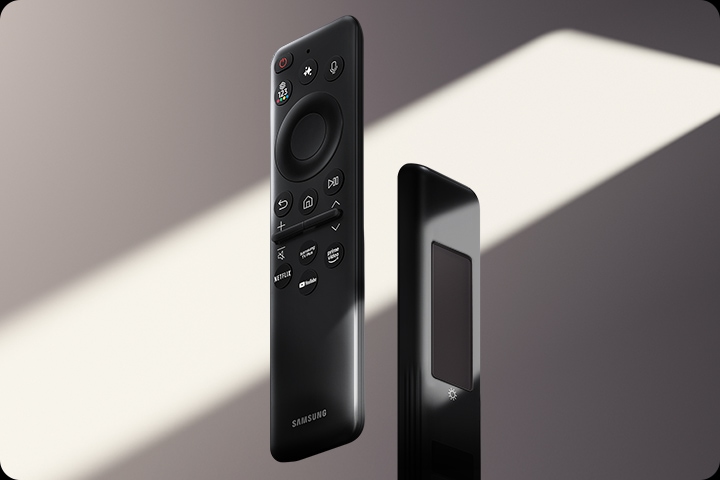
With a solar panel on its back, our SolarCell Remote is charged by light — no need for disposable batteries. And with smart features like a built-in microphone and voice assistant, this remote is innovative in more ways than one.
* To charge the remote with solar energy, set the TV remote down with the solar panel facing up. Place it in your living room while your lights are turned on, or you can place it near a window where it will soak in natural sunlight.* In case the remote’s battery is depleted, you can charge it using a USB-C cable. To check the remaining battery level of the remote control, refer to the TV Menu (Settings > General & Privacy > Power & Energy Saving > Available Remote Battery).






| Brand |
|---|
Related products

Electronics


Electronics

Electronics

Electronics


Electronics

Electronics